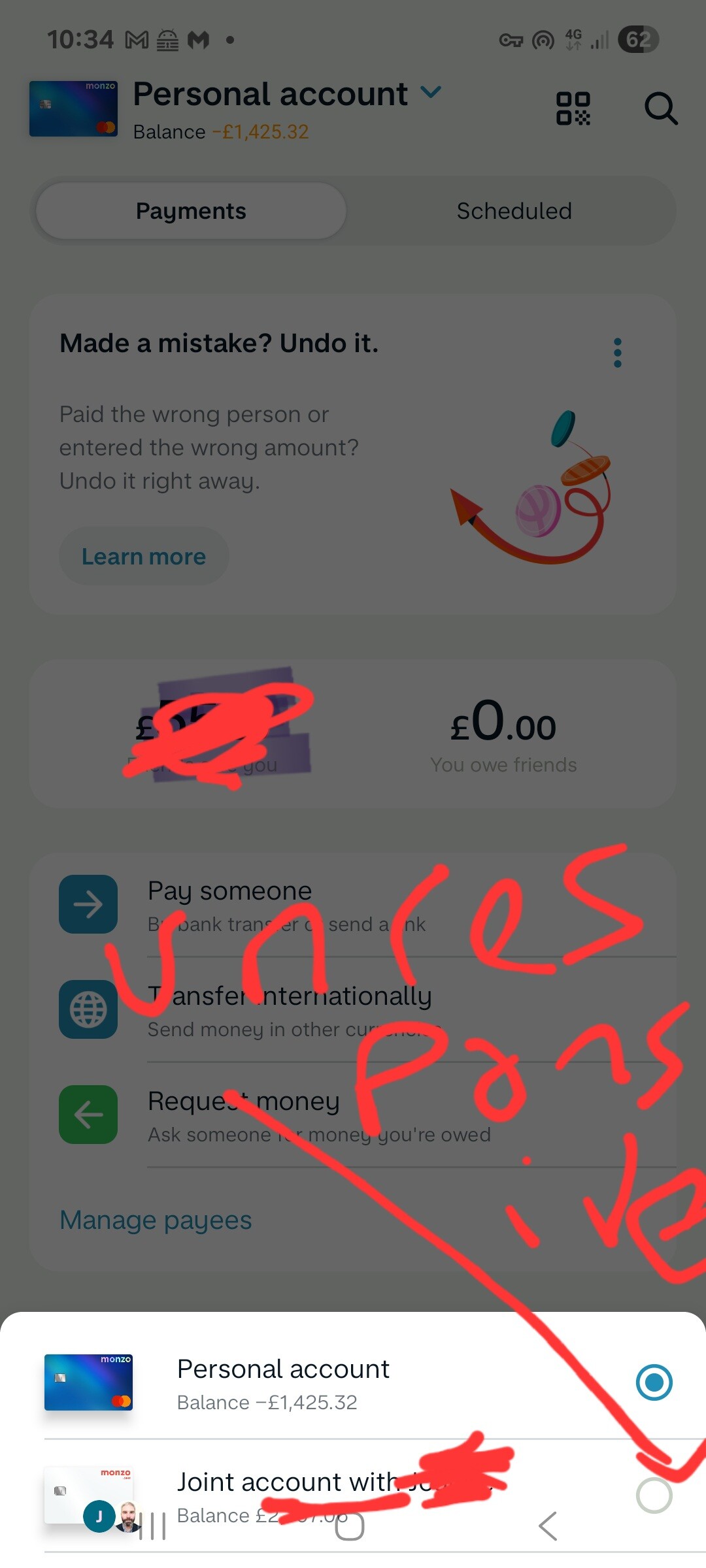
Issue: In the “payments” screen, the on-screen android action buttons at the bottom of the screen obscure the radio button selector for the account that is listed last, rendering it unresponsive and inhibiting the ability to select that account
Details to reproduce: Home->Payments->click on the acount selector dropdown at top of screen (In my case this is “Personal Account”). This then opens (in my case) two radio buttons at the bottom of the screen for “Personal Account” and “Joint Account” - the latter, as the last account to be shown, can not be selected as the android buttons render the radio button unresponsive.
I’ve just tried this. While I have Gesture Navigation set as my default nav-style (hate the 3-button nav) - I switched to 3-button nav, opened Monzo → Payments → top account selector → both selections (Personal/Joint) can be tapped and selected OK at the bottom of the screen. The 3-button nav doesn’t interfere with the selection.
Quickly back to Gesture nav again
I’m on Android 16 on a Pixel 8 Pro - could it be the screen resolution on your device that is interfering with the tap area at the bottom when 3-button nav is enabled?
Thanks for that @davidwalton, appreciate the very quick response.
I enabled swipe gestures (which I personally don’t like!), and this fixed the problem, but this is only a workaround.
My device is a stock A53 5G, which I’m pretty sure is 1080x2400 (FHD+) - I have noticed that I am able to select the required option “Joint Account” by clicking on a very small secton of the banner to the bottom left of the screen, just above the “J” banner on the joint account card icon, but below the separator line
Edit: I’ve also just been able to select the Joint account by clicking in a very small area of screen to the above left of the Joint Account radio button, but not on the radio button itself - the problem being if the touched area encroached on the navigation button then the phone’s “back” navigation button is activated.
So, not a showstopper - thankfully - but definitely a bug with the app when run on that resolution device with on-screen navigation enabled.
Details to reproduce:
**Android ** Samsung S22 :
**When trying to switch accounts by clicking the account bar at the top, it is not possible to select another one because the system menu shows on top. To fix it, the account selection menu needs to be at the top or elsewhere on the screen